

In the realm of software development, ensuring the reliability and functionality of applications is of paramount importance. Central to this process is software testing, which helps identify bugs, glitches, and other issues that could mar the user experience.
A critical aspect of software testing best practice is maintaining healthy test environments that mimic real-world usage scenarios.
In this post, we will delve into the concept of smoke testing (aka shakeout testing), a valuable technique for quickly assessing the health of your test environments.
What is Smoke Testing? The General Theory
Smoke testing, also known as build verification testing, is a preliminary testing phase that aims to determine if the most essential features of an application are working as intended. It involves running a subset of test cases to “smoke out” any major issues that could potentially disrupt further testing.
The primary objective of smoke testing is to catch show-stopping defects early in the development cycle. By doing so, it prevents wasting time on more extensive testing if the basic functionalities are flawed.
It’s important to note that smoke testing is not exhaustive.
It targets core functionalities and critical paths, not every single feature. Smoke testing can be executed either manually or through automated scripts. Automated smoke tests offer repeatability and speed, while manual tests allow for exploratory assessment.

Smoke Testing vs Other Types of Testing
Smoke testing is often confused with several other testing practices because they all aim to reduce risk early. However, each serves a distinct purpose, operates at a different depth, and answers a different question.
Understanding these differences helps teams apply smoke testing correctly and avoid redundant or misplaced testing effort.
1. Smoke Testing vs Sanity Testing
Smoke testing evaluates whether a build is fundamentally stable enough to be tested at all. It focuses on the most critical application paths and is typically executed after a new build or deployment.
Sanity testing, by contrast, is narrower and more targeted. It is usually performed after minor changes or bug fixes to confirm that a specific area of functionality still works as expected.
While smoke testing answers “Can we proceed with testing?”, sanity testing answers “Did this change break what it touched?”
2. Smoke Testing vs Regression Testing
Regression testing is designed to ensure that new changes have not broken existing functionality across the application.
It is broader, deeper, and far more time-consuming than smoke testing. Smoke tests act as a gatekeeper before regression begins. If a smoke test fails, running a full regression suite is usually a waste of time, as fundamental issues may invalidate the results.
3. Smoke Testing vs Unit Testing
Unit testing focuses on validating individual components or functions in isolation, typically during development.
These tests are written and run by developers and are concerned with code correctness at a granular level. Smoke testing operates at a higher level, validating that integrated components work together in a deployed environment. While unit tests confirm that the pieces work, smoke tests confirm that the assembled system is alive and functioning.
4. Smoke Testing vs Integration Testing
Integration testing verifies that different modules or services interact correctly, often under controlled conditions.
Smoke testing does not attempt to validate all integrations in depth. Instead, it performs a lightweight check that critical integrations are reachable and responding. Integration testing is about correctness and data flow, while smoke testing is about availability and basic operability.
5. Smoke Testing vs User Acceptance Testing (UAT)
User Acceptance Testing is performed to validate that the system meets business requirements and user expectations. It is typically conducted by business users or stakeholders in a controlled environment.
Smoke testing occurs much earlier and is not concerned with business validation or edge cases. Its role is to ensure that the application is stable enough for UAT to even begin.

Where Smoke Testing Fits in Your QA and Development Process
Smoke testing plays a distinct and strategic role within a modern quality assurance and development workflow. Rather than replacing other forms of testing, it acts as an early validation step that determines whether an application or environment is stable enough for further evaluation.
In most development lifecycles, smoke tests are executed immediately after a new build is created or deployed to a test environment. This timing is intentional.
By validating core functionality at the earliest possible stage, teams can quickly identify show-stopping issues before investing time in more exhaustive testing activities such as regression or integration testing.
Smoke testing also serves as a natural quality gate within CI/CD pipelines.
Automated smoke tests can be triggered after deployments or environment changes, providing rapid feedback on whether the system is operational. If smoke tests fail, the pipeline can halt, preventing unstable builds from moving downstream and contaminating test results in later stages.
Ownership of smoke testing is typically shared.
Ownership of smoke testing is typically shared. Development teams often help define and maintain smoke tests for critical application paths, while QA teams establish pass or fail criteria and ensure the tests remain aligned with real-world usage.
In organizations with dedicated platform or operations teams, smoke test results are also used as indicators of environment health rather than purely application correctness.
Importantly, smoke testing is not limited to code changes alone. Configuration updates, infrastructure modifications, or environment refreshes can all introduce instability. Running smoke tests after these changes helps confirm that the environment itself remains viable, reinforcing the connection between application reliability and environment management.
By clearly defining where smoke testing fits in the broader QA and development process, teams can use it more effectively as a safeguard. When applied consistently, it reduces wasted effort, accelerates feedback loops, and ensures that downstream testing activities are performed on stable, trustworthy foundations.
Basics of Smoke Testing: Getting Started
Choose test cases that encompass the core functionalities of the application. These might include login, basic navigation, and primary user interactions.
Ensure that the test environment closely mimics the production environment. This includes using the same hardware, software, and configurations to avoid false positives or negatives.
Run the selected test cases to validate their functionality. The focus is on quick execution to catch glaring issues. If all selected test cases pass, it suggests that the application’s basic functions are operational.
A failure indicates the presence of critical defects that need immediate attention.
Examples of Smoke Tests
Smoke tests focus on verifying the core functionality of an application quickly to ensure that critical features are working before deeper testing begins. Here are some common examples of smoke tests that teams typically perform.
1. User Login and Authentication
Verify that users can successfully log in and log out, including handling invalid credentials and session management.
2. Navigation Between Key Screens
3. Basic Data Entry and Submission
Check that users can input data into essential forms and submit successfully, with appropriate confirmation or success messages.
4. Critical API or Backend Services Availability
Confirm that vital backend services or APIs respond correctly and provide valid data.
5. Application Launch and Load Time
Ensure the application launches properly and loads within an acceptable timeframe without errors.
6. Basic User Interface Elements Load Correctly
Performing these smoke tests helps teams quickly identify major issues that could block further testing or usage, ensuring that the application is fundamentally stable before progressing.
Benefits of Smoke Testing
Smoke testing is an essential quality assurance practice that helps ensure software stability by quickly identifying critical issues early in the development cycle. The practice not only saves time and resources but also promotes collaboration and contributes to delivering a higher-quality product.
Below are the key benefits of the practice.
1. Early Detection of Major Issues
By running smoke tests early, teams can catch critical defects that could derail the entire build. Identifying these issues upfront prevents flawed builds from progressing further in the testing pipeline, saving significant time and effort.
2. Reduction in Rework and Project Delays
Detecting critical defects before more extensive testing begins reduces the need for costly rework. This early feedback loop helps avoid cascading problems, which can cause project delays and increase expenses.
3. Cost Savings
By minimizing wasted testing on unstable builds, smoke testing reduces unnecessary expenditure. It ensures that resources are focused only on builds that meet a basic level of stability, optimizing overall project budgets.
4. Enhanced Collaboration Between Teams
Regular smoke testing fosters better communication and collaboration between development and testing teams. Sharing early feedback on critical issues creates a shared responsibility for quality and encourages quicker resolution.
5. Improved Product Quality
By addressing major defects early, smoke testing contributes to a more stable and reliable product. This proactive approach leads to fewer bugs in later stages, resulting in a higher-quality final release.
6. Increased User Satisfaction and Trust
Delivering a stable and functional product enhances user confidence and satisfaction. Smoke testing helps ensure that critical functionalities work as expected, laying the foundation for a positive user experience and trust in the software.
Best Practices for Effective Smoke Testing
Here are some best practices to bring to bear in your efforts.
1. Define clear criteria
Establish unambiguous pass/fail criteria for Smoke Tests to minimize subjectivity.
2. Regular execution
Run smoke tests after every significant code change or build. This maintains a consistent quality assessment throughout development.
3. Documentation
Document the selected test cases, their outcomes, and any issues found. This historical record aids in understanding the application’s progress.
4. Collaboration
Foster collaboration between developers and testers. Their combined insights lead to better test case selection and more accurate interpretations.
Exploring Enov8 Environment Manager
As you seek to optimize your test environment management practices, consider leveraging Enov8 Environment Manager. This comprehensive solution offers a suite of features tailored to ensure the robustness and efficiency of your testing ecosystems.
Environment Blueprinting/Modelling
Enov8 facilitates the creation of detailed blueprints or models of your test environments. These visual representations provide insights into components and configurations, aiding in the identification of potential vulnerabilities.
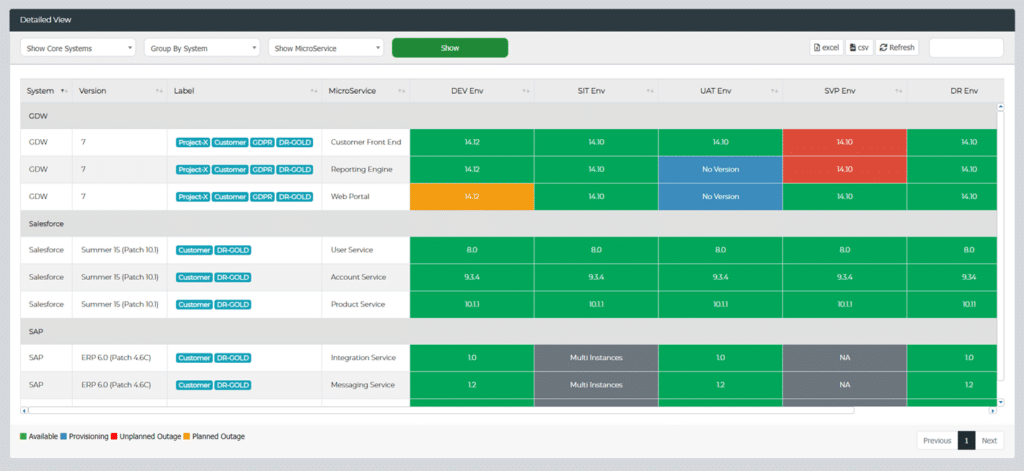
Health Dashboards
Gain real-time insights into the status of your test environments through Enov8’s intuitive health dashboards. Effortlessly monitor health metrics and promptly address any anomalies.
Notification Capabilities
Stay informed about the health of your test environments with Enov8’s versatile notification capabilities. Receive alerts via email or platforms like Slack, enabling swift responses to emerging issues.
Inbuilt Test Synthetics using BBOT
Enov8’s BBOT module empowers you to create rapid test synthetics. These tests validate platform availability for DevTest, streamlining your testing workflows.
Enov8 Health Check Screenshot
Conclusion
In the intricate landscape of software development, smoke testing stands as a sentinel guarding against the infiltration of major defects. By focusing on the essential, it paves the way for smoother testing processes, higher-quality software, and reliable test environments.
Remember, the health of your application and your testing ecosystem are intricately intertwined. Incorporate smoke testing into your testing regimen and consider exploring tools like Enov8 Environment Manager to further optimize your testing practices.

Post Author
Jane Temov is an IT Environments Evangelist at Enov8, specializing in IT and Test Environment Management, Test Data Management, Data Security, Disaster Recovery, Release Management, Service Resilience, Configuration Management, DevOps, and Infrastructure/Cloud Migration. Jane is passionate about helping organizations optimize their IT environments for maximum efficiency.