

SAP systems handle some of the most sensitive data in the enterprise: financial transactions, HR information, supplier records, customer profiles, operational details, and more. For that reason, copying production data into non-production systems without modification is rarely acceptable.
SAP users — whether they’re implementing S/4HANA transformations, maintaining ECC landscapes, or training staff — need realistic data for testing and validation, but they also need to prevent exposure of personally identifiable or confidential information. You don’t want the PR nightmare of carelessly exposing customer info.
SAP data masking solves this problem.
In this guide, we’ll walk through what SAP data masking means, how it works, how to get started, and how Enov8 helps organizations operationalize data masking as part of a broader environment and release management strategy.
What Is SAP Data Masking?
SAP data masking refers to the controlled transformation of sensitive production data before it is used in non-production environments such as development, QA, UAT, training systems, or sandboxes. Masking allows organizations to maintain realistic, production-like datasets while ensuring that no actual personal, financial, or operational identifiers remain exposed.
Unlike encryption, which protects data at rest or in transit, masking permanently alters the values. For example, an employee’s national ID, bank account number, or payroll amount might be replaced with format-preserving substitutes that look real but do not relate to an actual person.
This allows HR, finance, supply chain, and operations teams to perform regression testing, integration testing, training, and reporting validations without risking compliance violations.
Because SAP environments rely heavily on relationships across modules—such as FI integrating with MM, SD, and HCM—data masking must also preserve referential integrity to keep transactions valid and business processes functional.
Why SAP Data Masking Matters
SAP landscapes, especially those undergoing modernization or rapid release cycles, face pressure to supply abundant, production-like test data quickly. This often tempts teams to use direct copies of production databases, creating unnecessary security and compliance exposure.
SAP data masking matters for several reasons, but four are especially central for most enterprises.
1. The Sensitivity and Interconnectedness of SAP Data
SAP systems store extensive PII, payment data, payroll information, supplier records, pricing structures, and operational intelligence. The interconnected nature of SAP means that sensitive information does not appear in isolation—it spreads across tables, modules, and downstream analytics systems.
Because lower environments typically lack production-grade security controls, unmasked data increases both breach likelihood and impact.
2. Compliance Requirements Across the Entire Data Lifecycle
Regulations such as GDPR, CCPA, HIPAA, PCI DSS, POPIA, and regional data sovereignty laws mandate protection of personal data not just in production but everywhere it resides. That includes system copies, training systems, BW environments, integration sandboxes, and analytics platforms. Masking ensures data is anonymized before it moves downstream, reducing audit friction and avoiding costly remediation.
3. Reduced Security and Operational Risk in Non-Production Systems
Development and testing landscapes regularly involve contractors, offshore teams, third-party integrators, and automated pipelines. These users typically require broad access to validate integrations, workflows, and business processes. Using masked data helps organizations minimize exposure while enabling productive collaboration.
4. Improved Testing Quality and Faster Release Cycles
Testing with realistic data surfaces defects earlier and supports accurate performance assessments.
Masked data that behaves like production helps QA teams validate everything from procure-to-pay and order-to-cash flows to HCM payroll runs and financial closes. When masking is integrated into refresh and CI/CD cycles, teams achieve faster, more reliable releases.

How SAP Data Masking Works
SAP masking implementations must account for differences in architecture across ECC, S/4HANA, BW/4HANA, CRM, SRM, SuccessFactors, Ariba, Concur, and related platforms. At a high level, however, most masking approaches fall into two categories.
1. Static Data Masking Before Data Reaches Non-Production
Static masking transforms data during system copy or refresh processes. This is the most common approach for SAP because it ensures that masked data is the only data that ever enters non-production.
The transformed data is written to the QA or UAT system, where teams can begin testing immediately. This approach aligns closely with Enov8’s automation model because it enables standardized, referentially-intact transformations across entire SAP landscapes.
2. Dynamic Masking Applied at Runtime
Dynamic masking occurs when SAP UI Masking or SAP HANA masking rules redact sensitive fields at query time. This is useful when real data must remain intact in certain analytical or support contexts.
However, dynamic masking is generally not suitable for full test environments because it does not alter the underlying data and imposes runtime overhead. Most enterprises treat dynamic masking as a complement to static masking, not a replacement.
3. Masking Techniques Commonly Used in SAP Systems
SAP masking often involves format-preserving substitution, hashing, tokenization, shuffling, or deterministic replacement. Deterministic approaches are especially important in SAP because employee IDs, vendor numbers, material master data, and transaction references must stay consistent across modules for processes to remain executable.

Two Core Approaches to SAP Data Masking
The method used for masking depends heavily on whether the SAP system is cloud-based or hosted on-premises. Each deployment model imposes different technical and governance constraints.
1. Masking Cloud-Hosted SAP Products via Extract–Mask–Load Pipelines
For solutions such as SuccessFactors, Ariba, Concur, and certain SAP BTP services, customers do not have direct access to the underlying databases. Data must therefore be masked outside the SaaS boundary.
The typical process involves the following steps:
- Extract the relevant data through approved interfaces or snapshots.
- Apply masking rules within the customer’s controlled environment using platforms like Enov8.
- Load the anonymized dataset into non-production or analytical environments.
This approach maintains the integrity of the SaaS platform while ensuring that realistic, protected data is available for testing or training. Enov8 helps orchestrate this process by integrating masking directly into pipeline automation, validation, and environment management workflows.
2. Direct Masking of On-Premise or Hosted SAP Databases
Organizations running ECC, S/4HANA, BW/4HANA, or CRM on-premise or in private clouds can mask data directly on system copies. In these cases, Enov8 connects to the target instance, analyzes sensitive fields, identifies relationships across tables and modules, applies referentially-aware masking, and then validates functional integrity.
Because masking occurs within the refreshed environment itself, teams can automate the entire provision-and-mask workflow, reducing manual steps, improving reliability, and accelerating refresh cycles.
How to Implement SAP Data Masking: A Practical End-to-End Process
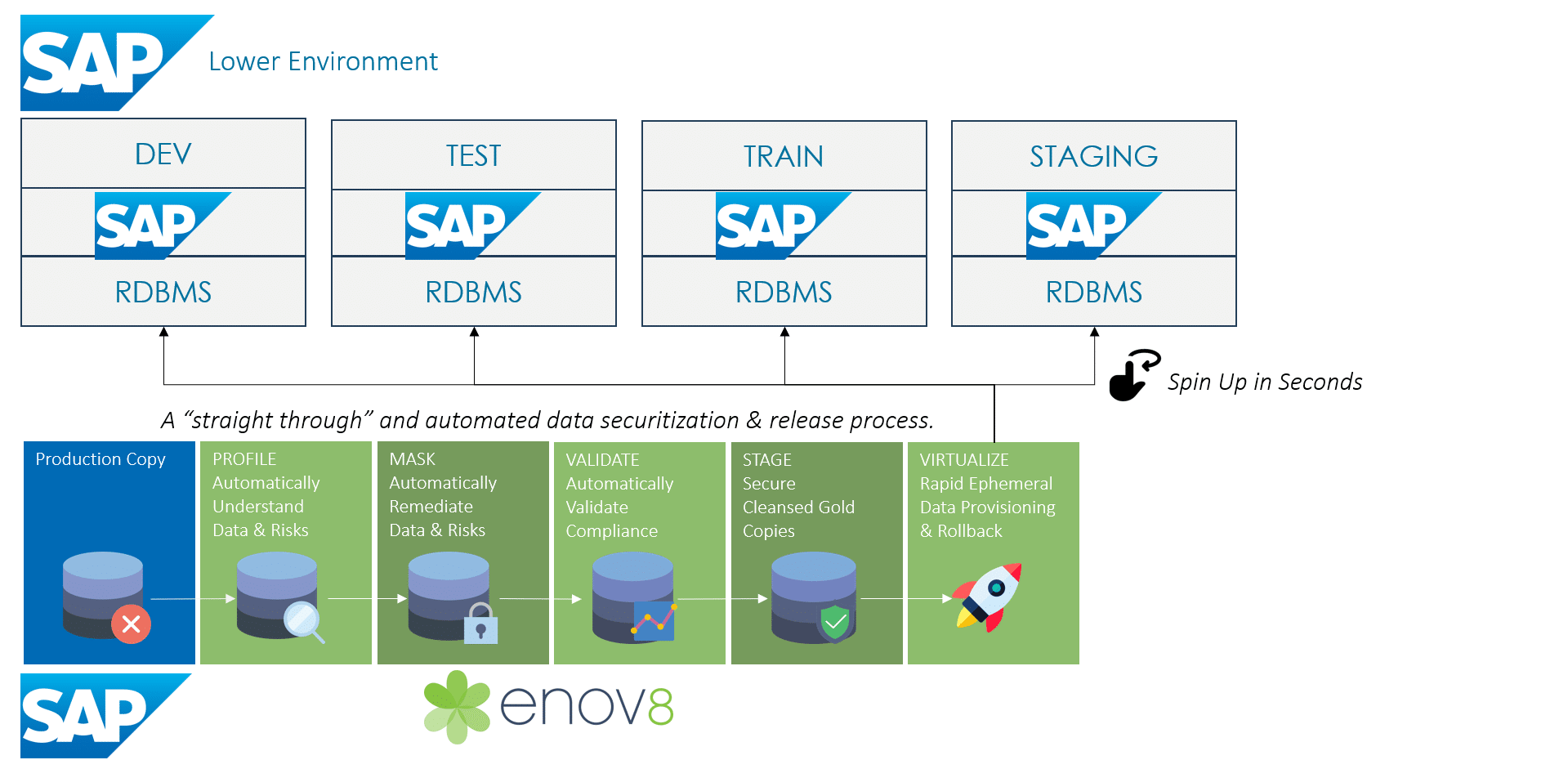
Regardless of whether you operate cloud SAP systems or on-premise ones, successful masking requires a disciplined, repeatable, and auditable workflow. The following six stages represent a proven approach.
1. Identify Sensitive Data Across All SAP Modules
This includes structured data, semi-structured data, custom Z-tables, attachments, logs, and free-text fields. Because SAP environments often evolve over decades, discovery must be automated and continually updated. Platforms like Enov8 profile the data automatically, identifying where PII, financial data, and other sensitive attributes reside.
2. Classify and Catalog All Data Sources
SAP landscapes often feed BW, external reporting systems, integration hubs, and analytics platforms. Mapping the flow of sensitive data across these systems is essential for properly scoping masking rules and ensuring downstream consistency.
3. Define Deterministic and Format-Preserving Rules
Organizations must specify how to transform names, addresses, payroll amounts, vendor numbers, financial identifiers, materials, and transactional fields. Rules must remain deterministic so that values remain consistent across modules and releases.
These rules should also be version-controlled so that masking remains stable across multiple refresh cycles.
4. Apply Masking Transformations According to Deployment Model
Cloud systems rely on the extract–mask–load pattern. On-premise systems allow masking directly on the copied QA or UAT database. Enov8 automates both approaches by orchestrating refresh steps, integrating rules, preserving referential integrity, and removing manual touchpoints.
5. Validate Data Integrity and Application Behavior
Validation typically includes referential checks, functional testing of core business processes, assessment of data realism, and verification that business rules continue to operate correctly. Enov8 includes built-in validation designed to confirm compliance and ensure testing teams operate on a reliable dataset.
6. Maintain and Monitor Masking Rules Over Time
SAP landscapes change frequently due to upgrades, customizations, schema modifications, and integration adjustments. Masking rules must evolve accordingly. Treat masking as an ongoing discipline, not a one-time project.
Common Challenges in SAP Data Masking (and How to Address Them)
Enterprises often struggle with masking because SAP environments are highly interconnected and heavily customized. Below are four challenges that appear frequently and how Enov8 helps solve them.
1. Preserving Referential Integrity Across SAP Modules
SAP transactions rely on linked keys across FI, MM, SD, PP, HCM, and CRM. Masking must maintain these relationships or process flows break. Enov8 detects these relationships automatically and applies deterministic transformations that keep the model intact.
2. Masking Custom Z-Fields and System Extensions
Many SAP implementations rely heavily on custom developments, making manual masking brittle. Enov8’s profiling identifies sensitive attributes in both standard and custom tables, ensuring complete coverage without guesswork.
3. Avoiding Performance Bottlenecks in High-Volume HANA Environments
SAP HANA’s in-memory, column-store architecture requires masking approaches optimized for large datasets. Enov8 performs masking directly on the refreshed database, minimizing extract costs and allowing for parallelized operations.
4. Ensuring Consistency Across Connected Systems
SuccessFactors, BW/4HANA, Ariba, and analytics tools often rely on shared keys or replicated tables. Enov8’s referential-aware engine preserves these relationships across system boundaries, ensuring that testing and reporting remain accurate and coherent.
Best Practices for SAP Data Masking
The most successful SAP masking programs follow a consistent set of operational practices. Organizations should:
- Centralize masking policies across all SAP landscapes and non-production environments.
- Use deterministic, referential-aware masking rules to preserve business process execution.
- Integrate masking into environment refresh cycles and CI/CD workflows.
- Maintain audit trails and documentation for compliance and governance.
- Validate application behavior after every masking cycle using regression tests and automated checks.
- Update masking logic regularly as SAP systems evolve through upgrades and new modules.
Tools and Technologies to Support SAP Data Masking
Some organizations attempt to mask SAP data using manual scripts or localized ETL jobs. While these may work for simple cases, they quickly become unsustainable as systems grow more complex. SAP-native tools, such as UI Masking or HANA runtime masking, can help in specific scenarios but do not cover full-environment transformations.
Platforms like Enov8 provide centralized governance, reusable masking libraries, automated profiling, direct integration with SAP environment refresh cycles, and end-to-end validation. Whether an enterprise uses cloud products, on-premise SAP systems, or hybrid landscapes, Enov8 ensures consistent, automated, and audit-ready masking across all environments.
Key Takeaways
SAP data masking enables organizations to protect sensitive data while preserving realistic test, training, and analytical environments. The right approach depends on the deployment model: cloud SAP systems require extract–mask–load pipelines, while on-premises systems allow masking directly on the copied database.
Enov8 supports both models with standardized rules, automated pipelines, referential integrity preservation, and integration into environment and release management workflows. By aligning masking with refresh cycles and governance practices, enterprises improve compliance, reduce risk, and accelerate the delivery of secure, production-like test environments.
