
Database Virtualization Solution
Create lightweight, production like database copies on demand, reduce storage cost, accelerate test data provisioning, and give teams governed access to the data they need for development, testing, support, and release validation.
The Enterprise Database Bottleneck
Enterprise delivery teams depend on realistic data to build, test, validate, and support critical applications. But traditional database copies are slow to create, expensive to store, difficult to refresh, and hard to govern.
As databases grow, non production teams often wait days or weeks for usable data. This delays testing, increases environment contention, creates unnecessary storage cost, and can expose sensitive information if production data is copied without the right controls.
What is Database Virtualization?
Database virtualization allows teams to create lightweight, isolated database copies from a shared source image or snapshot. These virtual databases behave like full database copies, but they can be provisioned faster and consume significantly less storage than traditional physical copies.
For development, testing, UAT, support, and release validation, this means teams can access realistic data faster, refresh it more often, and reset it when needed without repeatedly creating full database duplicates.
Tip! Database virtualization is different from data virtualization. Database virtualization creates virtual database copies for operational use. Data virtualization creates a logical access layer across multiple data sources for reporting, analytics, or integration.
Why Database Virtualization Matters
Database virtualization matters because data availability is one of the biggest hidden constraints in enterprise software delivery. Teams may have modern DevOps pipelines, automated testing, and cloud infrastructure, but delivery still slows down if realistic test data is difficult to access, refresh, or govern.
By making database copies faster, smaller, and easier to control, database virtualization helps organisations reduce delivery delays, improve test coverage, lower storage cost, and provide safer access to production-like data.
| Outcome | Why it matters |
|---|---|
| Faster data provisioning | Teams spend less time waiting for database refreshes. |
| Lower storage cost | Lightweight clones reduce duplicated database footprint. |
| Better test coverage | Teams can test against realistic, current data. |
| Faster defect resolution | Support teams can recreate issues using relevant data states. |
| Improved governance | Access, usage, expiry, and audit controls reduce risk. |
| Better release confidence | Data readiness becomes part of delivery planning. |
Database Virtualization Solution Capabilities
Database virtualization gives organisations a faster, more controlled way to provision production-like database copies for development, testing, support, training and release validation, without relying on full physical database duplication.
It helps reduce storage overhead, accelerate data availability, improve governance over database usage, and align data provisioning with environment, release and lifecycle demand.
| Capability | What it enables |
|---|---|
| Source database ingestion | Connect to enterprise database sources and prepare them for controlled virtualization. |
| Snapshot management | Capture reusable database states that support repeatable testing and refresh cycles. |
| Lightweight cloning | Create virtual database copies without duplicating the full physical database footprint. |
| Rapid provisioning | Deliver database copies to development, test, UAT, support, and release environments faster. |
| Refresh and reset | Rewind, refresh, or reset data states to support repeatable testing and defect reproduction. |
| Access governance | Control who can request, access, and use database clones. |
| Lifecycle management | Retire unused clones to reduce sprawl and control cost. |
| Test data integration | Align database virtualization with masking, profiling, subsetting, and validation. |
| Environment alignment | Connect database clones to environment bookings, release windows, and delivery demand. |
| Audit and reporting | Provide visibility over data usage, clone lifecycle, ownership, and compliance posture. |
Common Database Virtualization Use Cases
Database virtualization is most valuable where teams need fast, repeatable, and governed access to realistic data across development, testing, release, support, training, and analytics activities.
| Use case | Description |
|---|---|
| Development database clones | Give developers fast access to realistic data without waiting for full database copies. |
| System integration testing | Refresh shared test environments with relevant data before major test cycles. |
| UAT and pre-production support | Provide stable, production-like data sets for business validation. |
| Defect reproduction | Recreate specific data states to investigate production or test defects. |
| Release validation | Align data refreshes with release planning, deployment windows, and readiness checks. |
| Ephemeral test environments | Create short-lived database environments for automated or project-specific testing. |
| Training environments | Provide repeatable data sets for onboarding, demos, and operational training. |
| AI and analytics sandboxes | Provide safer, governed data sets for experimentation before broader use. |
How Enov8 is Different
Many database cloning tools focus on creating database copies. Enov8 focuses on governing how those copies are requested, provisioned, used, refreshed, and retired across the enterprise delivery lifecycle.
This matters because database virtualization without control can create a new form of sprawl. Enov8 connects database virtualization with test data management, environment management, and release governance, helping organisations deliver data on demand without losing visibility or control.
| Traditional approach | Limitation | Enov8 difference |
|---|---|---|
| Full database copies | Slow and storage-intensive. | Lightweight virtual database clones. |
| Manual refresh scripts | Inconsistent and hard to audit. | Standardised, governed provisioning workflows. |
| Storage snapshots | Infrastructure-centric. | Connected to delivery demand, environments, and releases. |
| Point cloning tools | Limited enterprise context. | Integrated with Test Data, Environment, and Release Management. |
| Uncontrolled self-service | Risk of sprawl and data exposure. | Policy-based access, lifecycle control, and audit visibility. |
| Isolated data operations | Poor alignment with release planning. | Data readiness linked to project and release demand. |
Powered by Enov8 VirtualizeMe
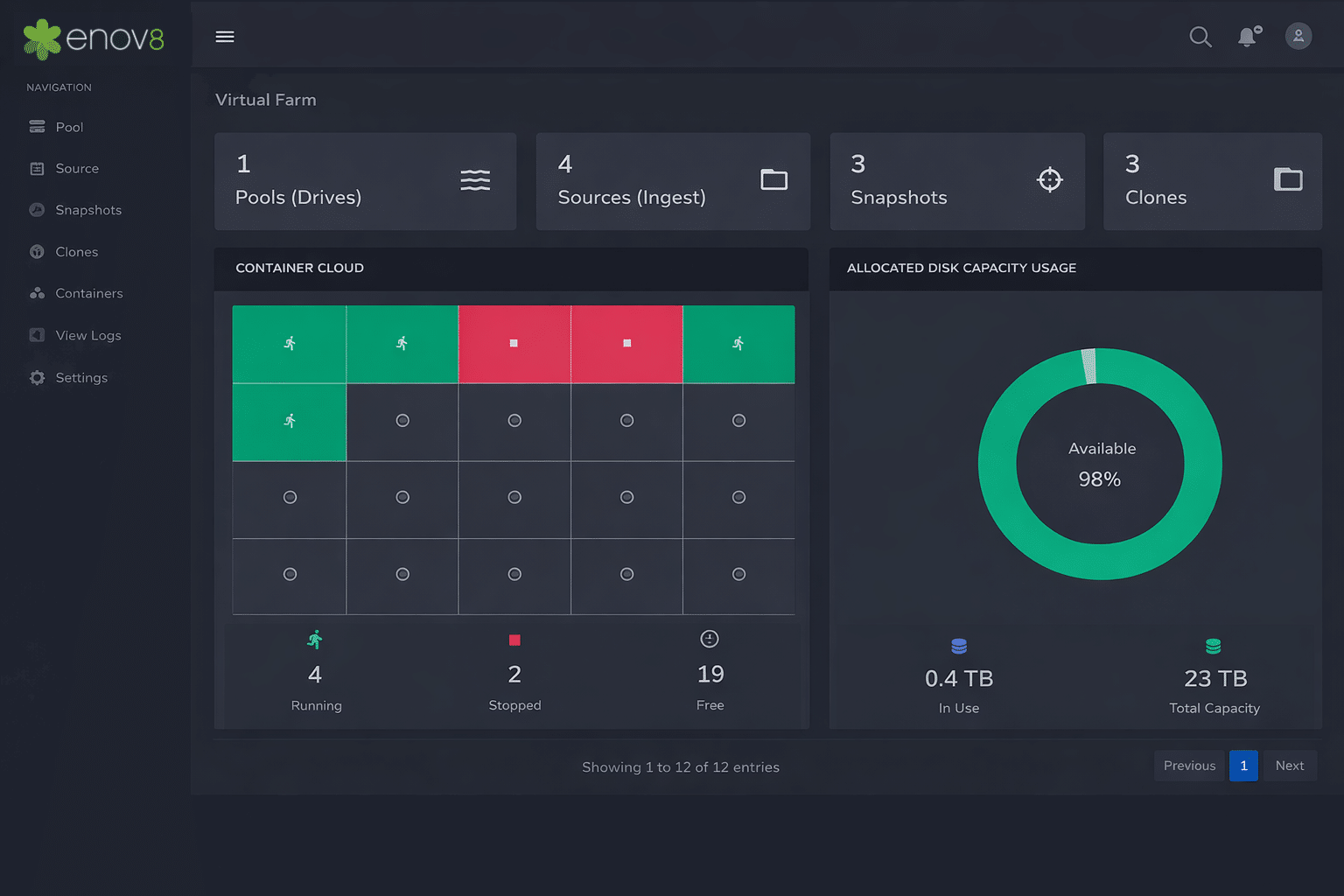
Enov8 Database Virtualization is powered by VirtualizeMe, Enov8’s database cloning and provisioning capability. VirtualizeMe helps teams create lightweight database copies, refresh test data faster, and align data provisioning with environment and release demand.
Rather than treating database cloning as an isolated technical task, VirtualizeMe connects database provisioning to the broader Enov8 platform, supporting visibility, governance, lifecycle control, and delivery coordination.
Related Solutions
Explore related Enov8 solutions that connect Applications, Environments, Release and Data across your landscape.
Database Virtualization FAQ
What is database virtualization?
Database virtualization is the creation of lightweight, isolated database copies from a shared source image or snapshot. These copies behave like full databases but can be provisioned faster and with less storage overhead than traditional database duplicates.
How is database virtualization used in software testing?
It gives development, QA, UAT, and support teams fast access to realistic database environments for testing, debugging, release validation, and defect reproduction.
How does database virtualization reduce storage cost?
Instead of creating multiple full physical copies of a database, database virtualization creates lightweight clones that share common underlying data blocks or source images.
Is database virtualization the same as data virtualization?
No. Database virtualization creates virtual database copies for development, testing, and operational use. Data virtualization provides a logical access layer across multiple data sources for reporting, analytics, or integration.
Does database virtualization remove the need for data masking?
No. If production like data contains sensitive or regulated information, masking, profiling, validation, or synthetic data generation should still be used before broad non production access.
Can database virtualization support DevOps and CI/CD?
Yes. Database clones can be provisioned through controlled workflows or automation patterns to support faster testing, repeatable environments, and pipeline driven delivery.
How does Enov8 support database virtualization?
Enov8 supports database virtualization through its VirtualizeMe capability and connects it with broader Test Data Management, Environment Management, and Release Management governance.
Database Virtualization with Enterprise Control
Enov8 helps organisations move beyond slow, expensive and unmanaged database copies. With database virtualization connected to test data, environment and release governance, teams can access the data they need faster while maintaining control over cost, compliance and lifecycle risk.