

As IT & Test environments become increasingly complex and dynamic, IT professionals need tools that can help them manage the complexity and ensure consistency across systems. Ansible is designed to address these challenges.
In this post, we’ll provide an introduction to Ansible (a key Enov8 plugin), covering the basics of how it works, the components that make up the Ansible architecture, and how to use Ansible to automate IT tasks. We’ll also cover some real-world examples of Ansible usage, as well as some best practices for using Ansible in your own IT operations.
By the end of this post, you should have a solid understanding of what Ansible is and how it can be used to simplify your IT Environment management workflows.
Ansible Basics: What is Ansible and How Does It Work?
Ansible is an open-source automation tool that simplifies the process of IT configuration management, application deployment, and orchestration.
Now part of Red Hat, Ansible enables IT professionals to automate repetitive tasks and streamline complex workflows, Ansible enables IT professionals to automate repetitive tasks and streamline complex workflows, making it an indispensable tool for managing modern IT environments.

What Makes Ansible Different?
One of the reasons Ansible has become a popular IT automation tool is its relatively simple architecture. Unlike some configuration management tools, Ansible is agentless, meaning you typically don’t need to install and maintain special Ansible software on every system you want to manage.
Instead, the Ansible control node connects to managed systems using existing technologies such as SSH for Linux and Unix systems or Windows Remote Management (WinRM) for Windows systems. This can make it easier to introduce Ansible into an existing IT environment without adding another agent that administrators need to deploy, update, and monitor.
Another important concept is idempotence. Ansible is designed so that running the same automation multiple times produces a consistent result. If a system is already in the state described by your playbook, Ansible generally doesn’t need to make the same change again.
For example, if a playbook specifies that Apache should be installed, Ansible can determine whether Apache is already present. If it is, there is no need to reinstall it. This desired-state approach makes automation more predictable and helps teams maintain consistent configurations across large numbers of systems.
Ansible Architecture
Ansible uses a control-node architecture, where the Ansible control node connects to managed nodes to execute automation tasks. The control node acts as the central point of control, while managed nodes typically do not require Ansible to be installed.
Ansible Components
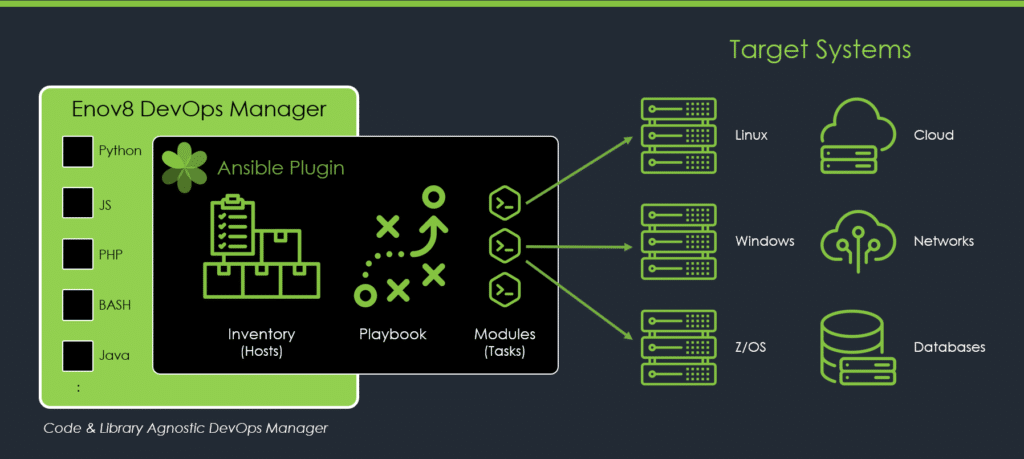
Ansible is made up of several components that work together to automate IT tasks. The key components are:
1. Inventory
This is a list of managed nodes that Ansible can connect to and manage. It can be in the form of a file, directory, or script.
2. Playbook
This is a file containing a set of tasks that Ansible will execute on a specific set of managed nodes. Playbooks are written in YAML format and can be used to manage infrastructure, applications, and services.
3. Module
This is a piece of code that performs a specific task, such as installing a package or configuring a firewall. Modules are written in Python and are executed on the managed nodes by Ansible.

Ansible Installation
To install Ansible, you’ll need a Linux or Unix-like system as the control node. Ansible can be installed on various operating systems, including Ubuntu, CentOS, Debian, and Red Hat Enterprise Linux.
Once installed, Ansible can be used to automate tasks on remote machines running various operating systems, including Windows, macOS, and other Linux distributions. In the next section, we’ll cover Ansible inventory and how to create it.
Ansible Inventory
An inventory is a file that contains a list of managed nodes that Ansible can connect to and manage. The inventory file can be a simple text file, a directory of files, or a dynamic script. The inventory file can also contain additional metadata about the managed nodes, such as the IP address, hostname, and variables that can be used in playbooks.
To create an inventory file, you can either create it manually or use a dynamic inventory script that pulls the list of managed nodes from a cloud provider or a configuration management database.
Types of Ansible Inventory
There are two types of inventory: static and dynamic.
A static inventory is a list of managed nodes that is defined in a file, while a dynamic inventory is a script or a plugin that generates the inventory on the fly based on external data sources, such as a cloud provider or a configuration management database.
Best Practices for Ansible Inventory Management
To ensure consistency and accuracy in your inventory, it’s important to follow some best practices:
- Use groups to organize your managed nodes based on their roles or functions.
- Use variables to store common configuration settings that can be reused across multiple playbooks.
- Use aliases to simplify the naming of your managed nodes.
- Use tags to group related tasks in your playbooks.
Ansible Playbooks
A playbook is a file that contains a set of tasks that Ansible will execute on a specific set of managed nodes. Playbooks are written in YAML format and can be used to manage infrastructure, applications, and services. Playbooks are executed sequentially, with each task being executed in the order specified in the playbook.
To create a playbook, you’ll need to define the tasks that you want Ansible to perform on your managed nodes. Each task is defined using a module, which performs a specific action on the managed nodes. Playbooks can also contain variables, loops, conditionals, and handlers.
Ansible Playbook Structure
- Hosts: This section specifies the list of managed nodes that the playbook should be executed on.
- Variables: This section defines variables that will be used in the playbook.
- Tasks: This section specifies the list of tasks that Ansible should execute on the managed nodes.
- Handlers: This section specifies the list of handlers that should be triggered when a specific task is executed.
- Roles: This section organizes tasks and variables into reusable components.
Writing and Executing Tasks
To write a task in a playbook, you’ll need to define the module that should be used and specify the parameters that should be passed to the module. Here’s an example task that installs the Apache web server on a managed node:
yaml
- name: Install Apache web server apt: name: apache2 state: present
To execute a playbook, you can use the ansible-playbook command followed by the name of the playbook file. Here’s an example command to execute a playbook named: webserver.yaml: ansible-playbook webserver.yaml
As the playbook is executed, Ansible will display the output of each task and indicate whether it succeeded or failed. You can also use the --check flag to perform a dry run of the playbook to see what changes would be made without actually executing them.
Ansible Modules
Ansible modules are reusable pieces of code that perform a specific action on a managed node. Modules make it easy to automate tasks in Ansible, and they can be used to manage infrastructure, applications, and services.
Modules are important because they abstract away the details of how a specific task is performed, allowing you to focus on what you want to accomplish.
Types of Modules
Ansible comes with a large collection of built-in modules that can be used to manage various aspects of your infrastructure. Here are some common types of modules:
- System modules: these modules are used to manage system-level tasks like installing packages, managing users, and managing files.
- Cloud modules: these modules are used to manage resources in cloud platforms like AWS, Azure, and GCP.
- Network modules: these modules are used to manage network devices like routers and switches.
- Database modules: these modules are used to manage databases like MySQL and PostgreSQL.
- Web modules: these modules are used to manage web servers like Apache and Nginx.
How to Use Modules in Ansible Playbook
To use a module in an Ansible playbook, you’ll need to specify the name of the module and any parameters that should be passed to the module. Here’s an example task that uses the apt module to install the Apache web server on a managed node:
yaml
- name: Install Apache web server apt: name: apache2 state: present
In this example, the apt module is used to install the apache2 package, and the state parameter is set to present to ensure that the package is installed.
You can find a full list of modules in the Ansible documentation, along with examples of how to use each module.
Understanding the Ansible Ecosystem
Ansible has grown beyond a single automation engine. Today, there is a broader ecosystem of community and enterprise tools that organizations can use to build, share, and manage automation.
Ansible Core provides the underlying automation language, command-line tools, and framework used to execute Ansible automation.
Ansible Collections package related modules, plugins, roles, and other automation content together. Collections make it easier to extend Ansible for specific technologies and platforms, such as Kubernetes, VMware, AWS, Azure, and networking equipment.
Ansible Galaxy gives users a place to discover and share Ansible roles and collections. Instead of building every automation workflow from scratch, teams can use existing community content as a starting point and customize it for their environments.
Red Hat also offers Ansible Automation Platform, an enterprise platform built around Ansible automation. It adds capabilities designed for managing automation at a larger organizational scale, including orchestration, governance, security, and collaboration.
Understanding these pieces is helpful because “Ansible” can refer to the open-source automation technology itself or, more broadly, to the ecosystem of tools and content built around it.
Common Use Cases for Ansible
Ansible can automate a wide range of IT operations across infrastructure, applications, and cloud environments. Some common use cases include:
1. Configuration Management
Ansible can configure servers and applications consistently across environments, helping reduce manual work and configuration errors.
2. Application Deployment
Teams can use Ansible to automate application deployments, updates, and related configuration changes.
3. CI/CD Automation
Ansible can integrate with tools such as Jenkins and GitLab to automate steps in software build, testing, and deployment workflows.
4. Cloud Automation and Provisioning
Ansible can help provision and manage resources such as virtual machines, storage, and networking across platforms like AWS, Azure, and GCP.
5. Disaster Recovery
Teams can automate recovery tasks and environment restoration to help reduce downtime following an outage or other disruption.
These use cases demonstrate why Ansible can be useful throughout the IT lifecycle, from initially provisioning infrastructure to maintaining and updating environments over time.
Ansible vs. Terraform: What’s the Difference?
Ansible and Terraform are both widely used infrastructure automation tools, but they often handle different parts of the infrastructure lifecycle.
Terraform primarily focuses on provisioning infrastructure. For example, teams can use Terraform to create virtual machines, networks, storage resources, and cloud services. Ansible is commonly used to configure and maintain those systems after they have been created.
A typical workflow might look like this:
- Terraform creates a set of virtual machines in AWS, Azure, or another cloud platform.
- Ansible connects to those machines.
- Ansible installs the required software, configures services, creates users, applies security settings, and prepares the environment for an application.
- Teams continue using Ansible to apply configuration changes, patches, or updates over time.
There is some overlap between the tools, and Ansible can perform infrastructure provisioning as well. However, organizations don’t necessarily have to choose between Ansible and Terraform. They are frequently used together, with each tool handling different parts of infrastructure automation.
Benefits of Using Ansible in IT Operations
There are several benefits to using Ansible in IT operations:
- Automation: Ansible automates repetitive tasks, reducing the time and effort required to manage infrastructure and applications.
- Consistency: Ansible ensures that infrastructure and applications are configured consistently across all environments, reducing the risk of errors.
- Scalability: Ansible can scale to manage thousands of servers and applications, making it a powerful tool for large organizations.
- Security: Ansible can be used to manage secrets and sensitive data, ensuring that they are stored securely and not exposed.
- Cost-effective: Ansible is open-source and free to use, making it a cost-effective solution for IT operations.
Conclusion
In this guide, we’ve covered the basics of Ansible, including what it is, how it works, and its key features. We’ve also covered some best practices for using Ansible, including how to structure your playbooks and use modules effectively.
Finally, we looked at some real-world examples of how Ansible is used, its common use cases, and the benefits of using Ansible in IT operations.
Ansible is a powerful tool that can help you automate your IT operations and improve your organization’s efficiency and agility. By using Ansible, you can reduce the time and effort required to manage infrastructure and applications, ensuring consistency and reducing the risk of errors.
If you’re interested in learning more about Ansible and how it can help your organization, consider reaching out to Enov8. Enov8 is an IT Environment Management Platform that provides a wide range of tools and plugins, including an Ansible Plugin, to help you manage your IT operations more effectively.
With Enov8, you can automate your IT environment management, reduce costs, and improve the reliability and agility of your IT operations.

Post Author
Jane Temov is an IT Environments Evangelist at Enov8, specializing in IT and Test Environment Management, Test Data Management, Data Security, Disaster Recovery, Release Management, Service Resilience, Configuration Management, DevOps, and Infrastructure/Cloud Migration. Jane is passionate about helping organizations optimize their IT environments for maximum efficiency.