

In today’s data-driven world, businesses are constantly looking for ways to streamline their data management processes and maximize the value of their data assets. One approach that has gained popularity in recent years is virtualization, which allows multiple virtual resources to run on a single physical resource.
Virtualization has many benefits, including increased efficiency, scalability, and cost savings.
Two types of virtualization that are commonly used in data management are data virtualization and database virtualization. While these terms are sometimes used interchangeably, they actually refer to two different concepts with distinct goals and processes. In this post, we will explore the difference between data virtualization and database virtualization, and provide guidance on how to choose the right approach for your business.
Whether you are a data architect, a business analyst, or an IT manager, understanding the difference between these two types of virtualization is essential for making informed decisions about your data management strategy.

Definition
What is Database Virtualization?
Database virtualization is the process of creating multiple virtual databases that run on a single physical database. Each virtual database appears to the users and applications as a separate database, with its own schema, tables, and data.
However, all the virtual databases share the same underlying physical resources, such as disk space, memory, and CPU.
Database virtualization is often referred to as “data cloning” because it allows organizations to create copies of their databases quickly and easily, without having to physically move or duplicate data. This is particularly useful in environments where multiple copies of the same database are needed for development, testing, or reporting purposes.
Database virtualization has several advantages over traditional database management approaches.
- First, it reduces hardware costs by allowing multiple databases to share the same physical resources.
- Second, it improves data isolation and security, as each virtual database can have its own access controls and security policies.
- Third, it simplifies database management, as administrators can manage multiple virtual databases from a single console.
Database virtualization is compatible with various database management systems, including Oracle, SQL Server, and MySQL, and can be deployed on-premises or in the cloud. It is a powerful tool for organizations that need to manage large volumes of data while maintaining flexibility and scalability.
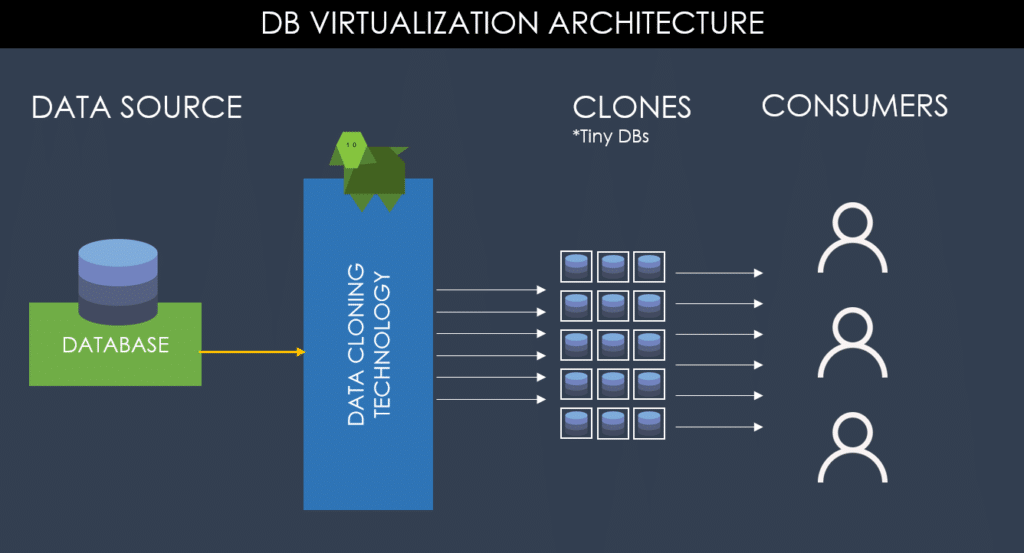
How Database Virtualization Works
Most database virtualization platforms follow the same basic pattern. Instead of copying a full database every time a team needs one, they store a single master image and give each team a lightweight virtual copy that shares it.
- Ingest: load a copy of the source database, such as a backup file or SQL dump, into the virtualization platform.
- Snapshot: take point-in-time snapshots of that image, so teams can return to a known state at any time.
- Clone: create virtual databases from a snapshot. Each clone behaves like a full, writable database but stores only its own changes.
- Provision: give each developer, tester or pipeline its own isolated clone, refresh it on demand, and remove it when it is no longer needed.
Virtual Databases vs Full Database Copies
| Full database copies | Virtual databases | |
|---|---|---|
| Time to provision | Hours to weeks, often through a DBA ticket | Typically seconds to minutes, often self-service |
| Storage | A full copy of the data for every environment | One shared image, plus only the changes each clone makes |
| Refresh and reset | Slow restores, so data is often stale | Refresh or roll back to a snapshot quickly |
| Isolation | Copies are often shared, so teams collide | Each person or pipeline can have its own copy |
| Automation | Mostly manual | Scriptable through an API or CLI, including from CI/CD |
Database Virtualization Use Cases in Non-Production
Database virtualization is most valuable in development and test environments, where many teams need realistic copies of the same databases:
- Parallel testing: give every test team or squad its own database instead of sharing one.
- CI/CD pipelines: spin up a clean database for each build, run the tests, then throw it away.
- Destructive and regression testing: run tests that change or break data, then reset the clone to its snapshot in seconds.
- Faster environment refreshes: bring environments back to current data overnight rather than over days.
- Lower infrastructure cost: reduce the storage needed to support many environments.
Virtual copies still contain whatever is in the source, so if that source holds personal data it should be masked before it is shared with teams.
What is Data Virtualization?
Data virtualization is the process of abstracting data from various sources, such as databases, data warehouses, and cloud services, and presenting it as a single, unified view.
With data virtualization, users and applications can access and analyze data in real-time, without having to physically move or copy data from one place to another.
Data virtualization is often used in environments where data is dispersed across multiple sources, or where data integration is a complex and time-consuming process. By creating a virtual layer on top of the data sources, data virtualization allows organizations to access and manipulate data as if it were stored in a single location.
Data virtualization has several advantages over traditional data integration approaches.
- First, it reduces data redundancy and improves data quality, as users and applications access a single version of the data.
- Second, it increases agility and flexibility, as changes to the underlying data sources can be reflected in the virtual layer without requiring modifications to the applications.
- Third, it simplifies data management, as administrators can manage data sources and access controls from a single console.
Data virtualization is compatible with various data sources and formats, including structured and unstructured data, and can be deployed on-premises or in the cloud. It is a powerful tool for organizations that need to integrate data from multiple sources while maintaining real-time access and flexibility.
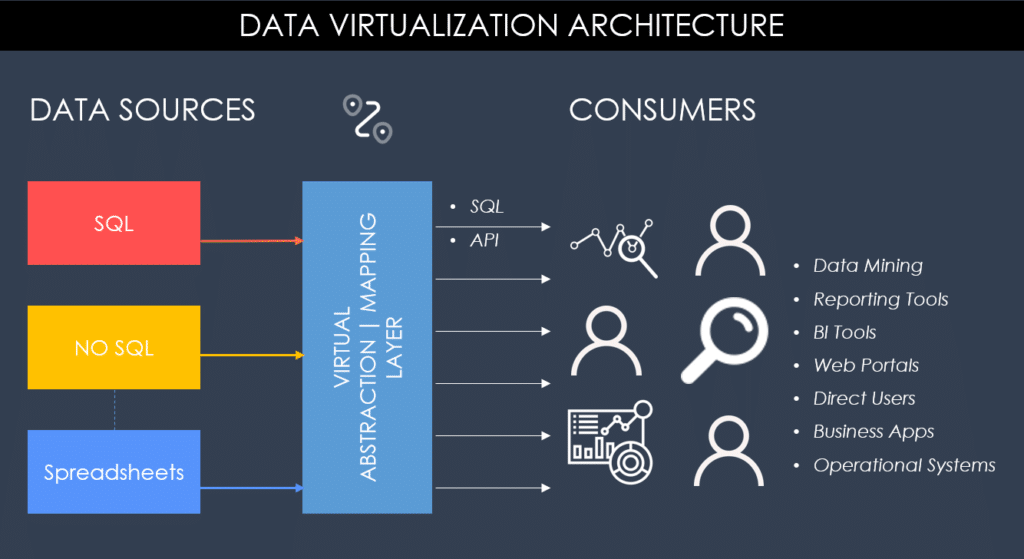
The Key Differences Between Database Virtualization and Data Virtualization
Although database virtualization and data virtualization share some similarities in terms of their virtualization approach, they are two distinct concepts with different goals and processes.
Database virtualization focuses on creating multiple virtual databases that run on a single physical database. It is primarily used to consolidate database infrastructure, reduce hardware costs, and improve data isolation and security. Database virtualization is commonly used in environments where multiple copies of the same database are needed for development, testing, or reporting purposes.
On the other hand, data virtualization focuses on abstracting data from various sources and presenting it as a single, unified view.
It is primarily used to integrate data from multiple sources, improve data quality, and increase agility and flexibility. Data virtualization is commonly used in environments where data is dispersed across multiple sources, or where data integration is a complex and time-consuming process.
Another key difference between database virtualization and data virtualization is their level of abstraction. Database virtualization creates virtual databases that are isolated from each other and from the physical database. In contrast, data virtualization creates a virtual layer on top of the data sources, allowing users and applications to access the data as if it were stored in a single location.

How Database Virtualization and Data Virtualization Work
Both database virtualization and data virtualization rely on abstraction layers, but they operate differently in how data is accessed and delivered.
How Database Virtualization Works
Database virtualization works by placing a virtualization layer on top of a single physical database. This layer allows multiple virtual databases to be created, each appearing as an independent system with its own schema, metadata, and access controls.
When a user or application interacts with a virtual database, queries are executed against the shared underlying physical database. The virtualization layer ensures logical isolation, so each environment behaves as if it were a separate database even though all resources are shared.
This approach enables organizations to quickly create multiple database environments without duplicating storage or infrastructure.
How Data Virtualization Works
Data virtualization takes a different approach by connecting to multiple independent data sources and creating a unified access layer across them.
Instead of moving or copying data, it queries each source in real time when a request is made. The virtualization layer breaks the query into sub-queries, retrieves data from relevant systems, and combines the results into a single unified response.
This allows users to interact with distributed data as if it were stored in one centralized system, even though it physically resides across multiple databases, applications, or cloud services.
Key Mental Model Difference
A simple way to understand the distinction is:
- Database virtualization = multiple isolated databases running on one shared system
- Data virtualization = one unified view created across multiple distributed systems
Think of it this way: Database virtualization is about separating environments within one database infrastructure and data virtualization is about combining data across many systems into one logical layer.
Which One Should You Choose?
The decision of whether to choose database virtualization or data virtualization depends on several factors, including data architecture, use cases, and IT resources.
If your organization needs to manage multiple copies of the same database for development, testing, or reporting purposes, or if you need to improve data isolation and security, then database virtualization may be the best choice for you.
On the other hand, if your organization needs to integrate data from multiple sources, improve data quality, or increase agility and flexibility, then data virtualization may be the best choice for you.
It’s also important to consider your IT resources when making this decision. Database virtualization typically requires specialized software and hardware, and may require significant upfront investment in infrastructure. Data virtualization, on the other hand, can be deployed on top of existing data sources and may require less upfront investment.
Ultimately, the choice between database virtualization and data virtualization depends on your organization’s specific needs and goals. It’s important to carefully evaluate both approaches and determine which one is the best fit for your data management strategy.
Real-World Use Cases
Understanding the practical applications of database virtualization and data virtualization helps clarify when each approach is most valuable in real environments.
Database Virtualization Use Cases
Database virtualization is most commonly used in scenarios where organizations need multiple isolated copies of the same database without duplicating physical infrastructure:
- Development and testing environments
Teams can spin up multiple virtual copies of production databases for safe development and QA testing. - Quality assurance and staging
Enables realistic testing conditions without risking production data integrity. - Database cloning for experimentation
Analysts and engineers can test schema changes, queries, or performance optimizations on cloned environments. - Training environments
Provides safe, consistent datasets for onboarding or internal training.
Data Virtualization Use Cases
Data virtualization is typically used in environments where data is distributed across many systems and needs to be accessed as a unified layer:
- Customer 360 views
Combines CRM, marketing, and support data into a single real-time customer profile. - Real-time dashboards and analytics
Enables BI tools to query multiple systems without waiting for ETL pipelines. - Cross-cloud and hybrid data integration
Connects on-prem databases with cloud platforms without physical data movement. - Mergers and acquisitions (M&A)
Helps unify data systems from different companies quickly without full migration.
Why This Matters
While both virtualization types improve efficiency, their value comes from different layers of the data stack—database virtualization optimizes infrastructure usage, while data virtualization optimizes access and integration.
Database Virtualization FAQs
What is database virtualization?
Database virtualization creates lightweight virtual copies of a database from a single master image. Each copy behaves like a full, writable database, but it is created far faster and uses far less storage than a physical copy.
What is the difference between database virtualization and data virtualization?
Database virtualization provides virtual copies of whole databases, mainly for development and testing. Data virtualization creates a unified, real-time view across many different data sources, mainly for analytics and integration, without moving the data.
What are the benefits of database virtualization?
The main benefits are faster provisioning, much lower storage use, isolated copies for each team or pipeline, quick refresh and rollback, and the ability to automate database delivery as part of CI/CD.
Is database virtualization the same as storage virtualization?
No. Storage virtualization pools physical storage devices so they can be managed as one resource. Database virtualization works at the database level, giving teams virtual copies of specific databases.
When should you use database virtualization?
It is most useful when many teams need copies of large databases for development and testing, when environments wait on data refreshes, or when storage for non-production copies is becoming expensive.
Give every team its own database in seconds
See how Enov8 VirtualizeMe (vME) clones and provisions full, isolated database copies from a single image, or explore our database virtualization solution.
Talk to an expertConclusion
In conclusion, understanding the difference between database virtualization and data virtualization is essential for making informed decisions about your data management strategy. Database virtualization focuses on consolidating databases, while data virtualization focuses on integrating data. While these two concepts share some similarities, they have different goals and processes.
Choosing between database virtualization and data virtualization depends on several factors, including data architecture, use cases, and IT resources.
Organizations that need to manage multiple copies of the same database for development, testing, or reporting purposes may find database virtualization to be the best choice. In contrast, organizations that need to integrate data from multiple sources, improve data quality, or increase agility and flexibility may find data virtualization to be the best choice.
Regardless of which approach you choose, virtualization is a powerful tool for streamlining data management, improving data quality, and reducing costs. Whether you are a data architect, a business analyst, or an IT manager, understanding the difference between database virtualization and data virtualization is essential for making the most of your data assets.

Andrew Walker is a software architect with 10+ years of experience. Andrew is passionate about his craft, and he loves using his skills to design enterprise solutions for Enov8, in the areas of IT Environments, Release & Data Management.