

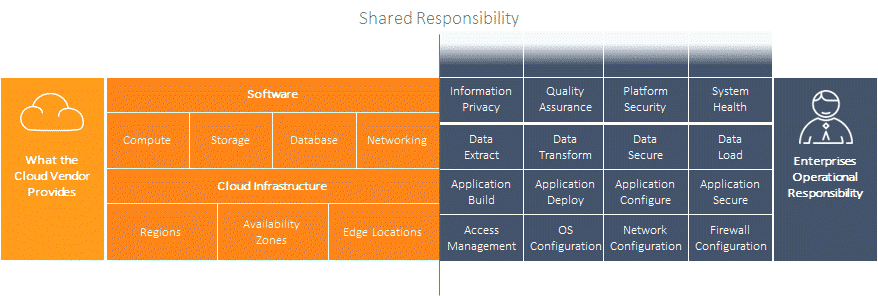
Spinning up an instance in AWS, Azure or Google Cloud takes minutes. Running the end-to-end platform that instance belongs to is another matter. Application tiers, data tiers, integrations and the relationships between them don’t get simpler just because they now run in the cloud.
Most of the complexity that existed before you migrated to the cloud is still there afterwards. So is the risk of operational mistakes that disrupt projects and customers. One of the most effective ways to reduce that risk is also one of the oldest: the playbook.
What Is an Operations Playbook?
A playbook, also called a runbook, is a documented, repeatable procedure for an operational task. It describes what needs to happen, in what order, who is responsible and how to confirm the task worked.
Typical examples include:
- Starting and stopping an environment
- Refreshing a test database
- Deploying a release
- Applying security patches
- Running a post-deployment shakedown
- Recovering a failed service
A good playbook turns tribal knowledge into a shared standard. It also becomes the baseline for improvement, because you can’t automate or measure a process that nobody has written down.
Why Cloud Operations Still Need Playbooks
The cloud changes where infrastructure runs. It doesn’t remove the need for discipline in how it’s operated. Without playbooks, teams tend to see the same problems:
- Heroics instead of process. Critical tasks depend on one or two experienced people who know how things really work.
- Inconsistent outcomes. Different teams do the same task in different ways, so results vary.
- No audit trail. When something goes wrong, nobody can say exactly what was done or when.
- Slow onboarding. New team members learn by trial and error.
- Scattered documentation. Procedures live in Word documents, spreadsheets and wikis that are hard to find and quickly go out of date.
Playbooks replace reactive firefighting with reliable methods that are easy to find, share and measure.
Attaching Playbooks to Your Environments
Playbooks are most useful when they sit next to the things they operate on. In the Enov8 platform, every object in your IT landscape can have knowledge, playbooks and automation attached to it. That includes:
- Environments
- Groups of systems
- Systems and platforms
- Instances
- Components
- Processes
This structure lets teams navigate complex production and test environments, find the right support documentation, centralize operational best practice, and launch and track operations from one place. Individual tasks, such as stop and start, refresh, deploy, secure, configure and shakedown, can call the DevOps tools you already use.

Three Styles of Playbook
Different tasks suit different formats. Enov8 playbooks come in three styles out of the box:
- Checklist. A traditional step-by-step list, well suited to infrequent or high-risk tasks where each step needs sign-off.
- Kanban. An agile board where tasks move through stages, useful when several people work on a procedure at the same time.
- Self-service. A push-button operation that lets consumers, such as project teams, run a fully automated task themselves without raising a ticket.
All three can connect to your existing tools, whether that’s AWS, Azure or Google Cloud, Puppet or Chef, Jenkins or TeamCity, or test tools such as Selenium. That removes the need to keep procedures in disconnected documents and to switch between tools that don’t talk to each other.
Example: A Test Database Refresh Playbook
To see how this works in practice, take a common task: refreshing a test database with the latest masked copy of production. A simple playbook might include these steps:
- Notify the teams using the environment and book an outage window.
- Stop the dependent application services.
- Back up any test data that needs to be kept.
- Restore the latest masked production snapshot.
- Apply environment-specific configuration, such as connection strings and test user accounts.
- Restart the application services.
- Run a shakedown to confirm the environment works.
- Notify the teams that the environment is available again.
Written down, this is a checklist anyone can follow. Tracked, it becomes an auditable record. Automated, it becomes a button a project team can press themselves.
The Playbook Maturity Journey
Playbooks also give you a way to measure how mature your operations are. Most organizations move through six stages:
- Chaos. Best-effort work with no documented process and no audit trail.
- Static playbook. Procedures are documented, but execution isn’t tracked.
- Live playbook. Procedures are documented and every execution is fully traceable.
- Hybrid playbook. Some steps are automated, the rest are manual, and everything is traceable.
- Automated playbook. The whole procedure runs automatically and is fully traceable.
- Self-service playbook. The automated procedure is exposed to consumers, who can run it on demand.
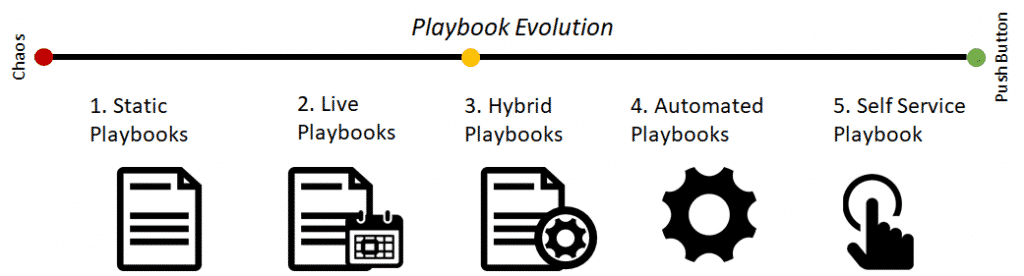
Not every process needs to reach stage six. A rarely used recovery procedure may be best left as a live playbook with manual steps. A daily environment refresh that several teams depend on is a strong candidate for self-service. The value is in knowing where each process sits and deciding where to invest next.
How to Get Started
- List your most common and most error-prone tasks. These give the fastest return.
- Document each one as a playbook. Include steps, owners, prerequisites and how to check it worked.
- Attach playbooks to the environments and systems they apply to, so they’re easy to find when needed.
- Track every execution. Recording who ran what and when gives you an audit trail and real data on how long tasks take.
- Automate the repetitive steps. Start with low-risk tasks and build confidence.
- Offer self-service where demand is high, so teams stop waiting in queues for routine work.
The Benefits
Adopting playbooks across your environments brings:
- Operational awareness. Everyone can see what’s happening across environments.
- Repeatable, reliable results. Tasks are done the same way every time.
- Continuous improvement. Execution data shows where to optimize and automate next.
- Faster delivery. Shorter operational cycles at both team and project level.
- Happier consumers. Project teams and customers get what they need with less waiting.
Learn More
Cloud platforms make infrastructure easier to provision, but they don’t make operations simpler on their own. Playbooks bring structure, consistency and traceability to the work that keeps your environments running, and give you a clear path from manual effort to automation.
To learn more about effective environment management and operations, talk to our team. Enov8 brings together information across your applications, data and infrastructure so you can understand, manage and orchestrate your IT landscape in one place.

Niall Crawford
Niall is the Co-Founder and Chief Information Officer of Enov8. He has over 25 years of experience working across the IT industry in Software Engineering, Architecture, IT & Test Environment Management and Executive Leadership. Niall has worked with and advised many global organisations covering verticals like Banking, Defense, Telecom, and Information Technology Services.