

Creating and executing an effective cutover plan is essential for a smooth transition from the current system to the new one. There are several steps to take when formulating a successful cutover plan:
- Defining the scope of the process
- Establishing a timeline
- Identifying and assigning resources
- Creating a risk assessment and mitigation plan
- Documenting all steps of the process
- Executing the cutover
It is important to document all steps of the process, as well as successes or failures that occur during the cutover.
As a result, the team can address any issues quickly and efficiently. Once all plans are in place, the cutover process can begin. Monitoring its progress and results is essential for a successful transition. Also, document every success and failure.
With these steps in place, you can complete the cutover process smoothly and effectively. Let’s explore in more detail.
Definition
A cutover plan is the detailed, time-sequenced schedule of tasks, owners, and checkpoints used to move from an old system or release to a new one in production, including the go/no-go decision, rollback steps, and post-go-live support.
What Is A Project Cutover?
A project cutover is the process an organization uses to move from one system to another. It involves the transfer of data, processes, and systems from the old system to the new system. Cutover is the time period between the end of the old system and the beginning of the new system.
It typically includes data conversion, testing, and training. During this time, the team puts the new system in place and makes it ready for use. The goal of a project cutover is to ensure a smooth transition to the new system and minimize disruption to the organization.
Isn’t that the same as a Deployment Plan?
Not entirely. A Deployment Plan is a comprehensive plan that outlines all the activities necessary to deploy a system or application to its target environment.
A Cutover Plan is a specific component of the Deployment Plan that focuses on transitioning from the old system or application to the new one. This includes tasks such as shutting down the old system, transferring data, and activating the new system.

Why is Cutover Planning Necessary for Enterprises?
In today’s digital-driven world, enterprises need to stay competitive in order to survive and remain profitable. As such, it is important for them to ensure that any changes they make to their systems or processes, such as upgrading technology or migrating a data center, are done in a timely, efficient, and secure manner.
This is where a cutover plan can come in handy.
A cutover plan is a detailed strategy that outlines all the steps necessary to transition from the current state of an enterprise’s systems to a new one, and it is essential for enterprises to have one in place in order to ensure a smooth transition and minimize any disruption to their operations.
This plan helps identify potential issues or risks that may arise during the transition. In addition, it sets a timeline for completing each step. It also helps to identify any resources or personnel required to complete the transition.
Ultimately, having a well-planned cutover plan in place helps enterprises to ensure a successful transition and maintain their operations without disruption.
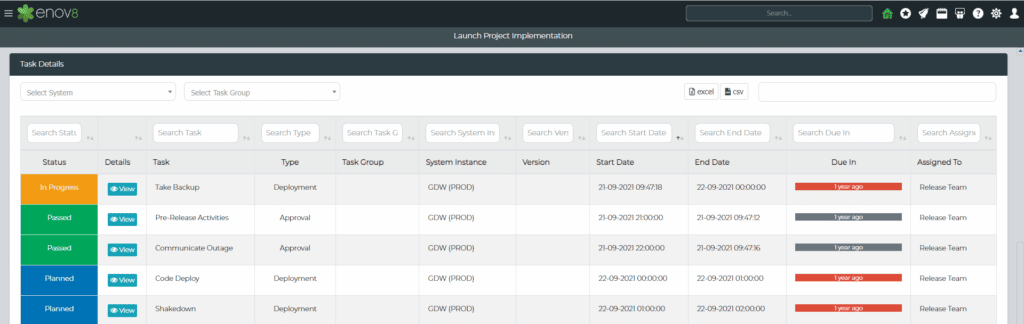
Enov8 Release Manager, A Project Implementation Plan: Screenshot
How Does One Plan for a Cutover?
When planning for a cutover, it is important to ensure that all stakeholders are aware of the timeline and the roles and responsibilities associated with the transition. By carefully mapping out the process and its components, companies can minimize the risks and maximize the success of the cutover.
The following steps provide a general overview of the planning process for a successful cutover:
- Establish the Cutover Team: This team should include representatives from all affected departments, such as IT, finance, operations, and customer service.
- Identify the Cutover Scope and Objectives: Create a list of all the tasks and activities your team must complete for a successful cutover.
- Create Detailed Timelines: Break down the objectives into smaller tasks and assign timelines to each task.
- Test the Cutover Scenario: Test the cutover process and ensure that all stakeholders are in agreement with the plan and the expected outcome.
- Document the Cutover Plan: Document the overall plan and all the tasks and timelines associated with it.
- Communicate the Cutover Plan: Ensure that all stakeholders are aware of the cutover plan and their respective roles and responsibilities.
- Monitor the Cutover Process: Track the cutover closely so the team finishes every task on time and to the highest quality standards.
By following these steps and taking the time to plan for a successful cutover, companies can minimize the risks involved and ensure a smooth transition.
Cutover Activities
To prepare for and support cutover, teams must complete several activities before, during, and after the event.
1. Pre-Cutover Day Activities
Before you begin the cutover process, complete several important activities. These activities help the cutover plan succeed and make sure every stakeholder is ready.
- First, all stakeholders should be briefed on the cutover plan and their respective roles and responsibilities. This includes reviewing the timeline and the steps the team will take during and after the cutover.
- A detailed check of the new system should be performed to ensure that all necessary data, configurations, and applications are in place and functioning correctly. This includes verifying the accuracy of migrated data and confirming the system configuration.
- A communication plan should be created and distributed to all stakeholders. This plan should include contact information for all key people involved in the cutover process and detail any expected disruptions to service or downtime.
- Finally, a test plan should be created and executed to ensure that the cutover is successful. This plan should include tests that check how the new system functions and verify that the data migrated successfully.
By completing these preliminary activities and preparing every stakeholder, you give the cutover plan the best chance of success.
2. Cutover Day Activities
On the day of the cutover, the team must complete several activities to ensure a successful transition. These include:
- Setting up the necessary infrastructure
- Performing data migration
- Testing the new system
- Performing the actual cutover
Additionally, there may be other activities to ensure that the system is functioning as expected, such as verifying user access, setting up backups, and running simulations. Finally, the cutover team must document the process and its results so others can follow the same process in the future.
3. Post-Cutover Day Activities
Once the cutover is complete, the team still has several activities to finish. Typical activities include:
- Testing and validation of the new system
- Training on the new system for users
- Data archiving and migration
- Performance monitoring
- Documentation of the new system
- Finalizing any configuration settings
- Ensuring proper system integration
- Establishing procedures for ongoing operations
- Setting up a feedback system for users
- Generating reports to track utilization and performance
- Establishing change control processes and procedures
- Ensuring compliance with applicable laws and regulations
- Setting up an audit process to verify system integrity
- Setting up a system for alerting when critical issues arise

Cutover Runbook (Step-by-Step Execution Guide)
A cutover runbook is a critical but often missing part of cutover planning. While most guides cover preparation and post-go-live activities, they rarely provide a clear execution script for the actual cutover window. A runbook turns the plan into a structured, time-based checklist that teams can follow in real time.
It ensures activities are:
- Executed in the correct order
- Assigned to clear owners
- Time-bound within the cutover window
- Verified before moving forward
1. Cutover Runbook Overview
A cutover runbook is the step-by-step execution guide used on cutover day. It ensures all tasks are performed in the correct order, by the right owners, and within defined time windows.
2. Pre-Cutover Validation (T-24 to T-1 Hours)
Final checks confirm system readiness, backup integrity, change freezes, and stakeholder availability. The team activates communication channels and the war room.
3. Cutover Initiation (T0)
The team shuts down the legacy system, starts the final data migration, and switches monitoring to high-alert mode.
4. Execution Phase (T+0 to T+X Hours)
The team deploys the new system, completes data loads, activates integrations, and finalizes configurations, validating after each step.
5. Validation and Smoke Testing
Next, the team tests critical business processes to confirm system stability before go-live approval.
6. Go-Live Confirmation and Transition
The business gives formal sign-off, the system goes live, and monitoring continues in stabilization mode.
7. Post-Cutover Monitoring (Hypercare)
Enhanced monitoring and rapid issue response ensure system stability during early production use.
Planning and Running Your Cutover with Enov8
A cutover plan often starts life as a spreadsheet, but spreadsheets struggle once dozens of teams, hundreds of tasks, and a fixed outage window are involved. Owners work from different versions, dependencies live in people’s heads, and nobody has a live view of progress at 2 a.m.
Enov8 Environment & Release Manager includes two capabilities built for this:
1. Implementation Planning
Plan the cutover as part of the wider release. Define the events, environments, and systems involved, and align teams to a single timeline.
2. RunSheets
Turn the cutover plan into an executable runbook. Each task has an owner, timing and dependencies, and can be a manual, notification, approval or automated step, so go/no-go checkpoints become approval gates and repeatable tasks run through your existing automation. Teams update status as they go, so the cutover lead sees what’s done, what’s running late, and what’s blocked in real time.
Together they give you one plan, one live runbook and one view of progress, from rehearsal runs through to the production cutover and, if needed, rollback.
Some Tips for a Successful Cutover
A successful cutover plan is essential for successful system migrations and implementations. Beyond planning, follow a few best practices to ensure a successful cutover.
1. Be Prepared for Anything
Be prepared for surprises.
Implementing a cutover plan can be complex. For this reason, prepare for any surprises that may arise. Make sure to identify any potential risks that could affect the success of the plan, and determine a strategy for dealing with them.
Additionally, plan for any contingencies that could arise, so that you are prepared to adjust and pivot if necessary. Finally, it is important to have a communication plan in place in order to ensure that everyone involved is aware of any changes or surprises that may come up during the cutover process.
2. Communicate Well and Triple-Check
The cutover plan should include detailed communication processes between all stakeholders and the project team.
Everyone should know the plan and the changes the team will make.
It is essential to ensure that all stakeholders are on the same page, and that there is no misunderstanding or miscommunication. Additionally, triple-check the plan and every change for accuracy and quality. As a result, the transition runs smoothly and stakeholders get the results they expect.
3. Plan the Implementation Early
It is important to plan for the early implementation of the cutover plan. This includes deciding when to start the transition, which tasks the team needs to do, and how much time to allow for each one. Additionally, make sure all stakeholders know their roles in the cutover plan. They should also know the expected timeline and any deadlines they must meet.
Furthermore, create a communication plan for all stakeholders. That way, the team can address questions or concerns quickly during the transition.
Finally, create contingency plans in case the cutover does not go as expected.
4. Test the Deployment Plan
Once the cutover plan is in place and all stakeholders have provided their approval, it is essential to conduct thorough testing to ensure that the plan will be successful when executed. Testing should cover all aspects of the deployment plan, including system functionality, user access, data accuracy and integrity, and security protocols.
Test each step of the plan thoroughly. This way, you confirm it works as expected and can find and fix issues before the actual cutover.
Testing should also include scenarios that simulate the actual cutover, so the system and users are ready for the transition.
5. Keep Alert and Be Ready
The cutover day is the most important day of the entire project, so it is essential to make sure that everyone involved is well-prepared. All members of the project team should have a clear understanding of their roles and responsibilities for the day, and must ensure that all of the necessary preparations and tests have been completed.
It is also important to monitor any changes in the environment, as well as to be alert for any unexpected issues that may arise during the cutover. In order to ensure a successful cutover, all members of the team must remain focused, alert, and available to respond to any problems that may arise.
Cutover Planning FAQs
What is a cutover plan?
A cutover plan is the step-by-step schedule for transitioning from a current system or release to a new one in production. It lists every task, owner, timing, dependency, go/no-go checkpoint and rollback step needed for a controlled switch.
What does cutover mean in a project?
In IT projects, cutover is the period and set of activities in which the old system is retired and the new system or release is moved into production and put into use.
What is the difference between cutover and go-live?
Cutover is the full set of activities used to make the transition, from final preparation through deployment and validation. Go-live is the specific moment the new system becomes available to users.
What is hypercare after cutover?
Hypercare is a period of heightened monitoring and support immediately after go-live, when the project team stays on hand to resolve issues quickly before handing the system over to business-as-usual support.
Who is responsible for the cutover plan?
A cutover or release manager usually owns the plan and coordinates the technical, testing, and business teams involved, running the schedule, the go/no-go decision, and communications on the day.
What tool can I use for cutover planning?
Teams with simple cutovers often get by with spreadsheets or project tools. Enterprises coordinating many teams, systems and environments benefit from a dedicated platform. Enov8 Environment & Release Manager combines Implementation Planning and RunSheets to plan, rehearse, execute, and track cutovers in one place. See RunSheets in action or talk to an expert.
Conclusion
In conclusion, cutover planning is an essential part of any successful project. It requires careful consideration of the tasks and resources needed to ensure a smooth transition from one system to another. By following the steps outlined in this guide, you can create a comprehensive cutover plan that will help you manage the risks associated with the transition and ensure a successful outcome.
With proper planning and execution, you can make sure that your project is completed on time and within budget. For enterprise cutovers, Enov8 Environment & Release Manager brings Implementation Planning and RunSheets together so you can plan, rehearse, and run the cutover from one live runbook.
