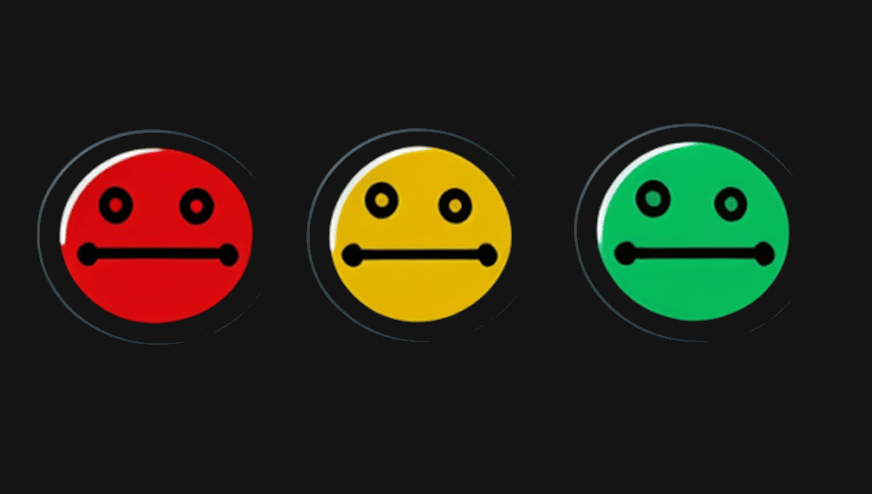
Effective Leadership requires effective tooling to drive successful outcomes. One tool they can use to monitor and measure progress is RAG status. RAG stands for Red, Amber, Green. It is a simple traffic light system that shows the current status of a project.
By using RAG, organizational leaders can identify and take action on items that require attention.
What is RAG Status?
RAG status is a reporting system that highlights project health using color-coded indicators.
Red indicates a project is behind schedule, over budget, or otherwise in trouble. Amber signals that while a project is on track, there are issues or risks that need further investigation. Green means all is well, and the project is progressing as expected.
In this article, we will explain how teams can utilize a RAG status analysis for software development, in particular release management. We’ll show you how to map the RAG model onto releases and projects. We’ll also explain what to do if a project stalls and turns red.
However, before diving into mapping techniques, let’s clearly define each color code according to its place in the scale of software project management.

What do the RAG Colors Mean
When it comes to software project management, the color red signifies a “stop” sign and requires conscious pause and deliberation. A red project needs serious attention and could fail if nobody acts.
1. What does a RED RAG Status Indicate?
When assessing a project’s status, three key resources come into play: time, budget, and scope.
If any of these resources are strained, or a task hasn’t started, the project may turn red. Teams often track this in a project orchestration tool, which shows the tasks needed to move a release forward.
A red RAG status tells programmers and managers that the project is fragile and needs urgent action. Therefore, project leads must act quickly to keep it on track.
2. What does an Amber RAG Status Indicate?
An amber RAG status means that a project or milestone is of moderate risk and requires immediate action to stay on track. It is not as serious as a red RAG status, however, it still requires attention and resources to prevent further delays. Typical signs of an amber RAG status include:
- Missing deadlines
- Increased resource usage
- Cost overruns
- Scope creep
- Poor communication
Project managers use RAG status to update stakeholders on progress and alert them when action is needed. If not addressed in a timely manner, an amber status can quickly become a red status, which can be difficult to recover from.
3. What does a Green RAG Status Indicate?
A green RAG status is the most desirable outcome when assessing a project. It indicates that a project is progressing as planned and that allocated resources, such as money, time, and talent, are sufficient or near perfect to achieve the tasks and milestones on time or ahead of schedule.
This is good news for project owners and leaders, as it means their planning was accurate and successful.
By understanding what each of the RAG status colors mean, teams can better apply them to modern workflows and software delivery. This can help them achieve even more successful outcomes for their projects.

How RAG Status Works in Practice
By understanding what each of the RAG status colors means, teams can better apply them to modern workflows and software delivery. This can help them achieve even more successful outcomes for their projects.
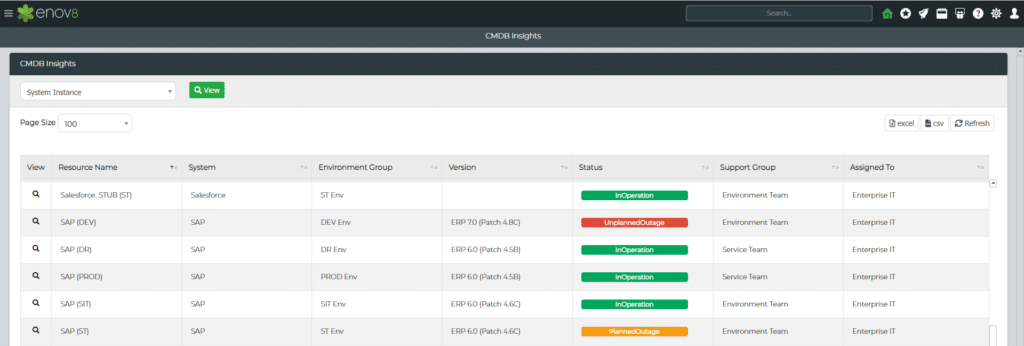
Enov8 Platform, CMDB RAG Status: Screenshot
Below is a screenshot from the Enov8 platform showing how RAG status is applied in practice, providing visibility into environment health and operational risk.
Using the RAG Scale within the Enov8 Platforms
Enov8 provides holistic solutions for IT & test environment management, Data Management and Enterprise Release Management. A core aspect of their solutions, beyond governance & orchestration, is the concept of insights, delivered through Information Walls, which provide observations to all areas of leadership and technology, for example insights to the steering committee, the Product Lifecycle Owners, & DevOps engineering.
Note: At Enov8, we also align to RAG, however, on special occasions when it’s more fitting, other colours may be used to signify different meanings – for example “Not Applicable” is usually represented by gray.
Some quick examples of how we use the colours:
Release Schedule RAG
- Red: The release is behind schedule, over budget, or blocked by significant issues.
- Amber: The release is progressing, but some risks or issues need attention.
- Green: The release is on track and meeting its objectives.
IT Environment Health RAG
- Red: The IT environment is experiencing significant outages or performance issues.
- Amber: The IT environment is stable, but some areas need close monitoring.
- Green: The IT environment is running smoothly and meeting its objectives.
Data Privacy RAG
- Red: The organization is not protecting data privacy well, and the risks are significant.
- Amber: The team monitors data privacy, but some areas need work.
- Green: The team manages data privacy well and has mitigated all risks.
Note: These are just a few examples, but you get the idea.
Rolling Up Multiple RAG Ratings into One Status
Each of these examples shows a category being scored on its own. In practice, most projects carry several of these ratings at once, and teams need a way to combine them into a single view.
Most projects don’t carry a single RAG rating. Instead, teams often score several dimensions individually, such as schedule, budget, scope, and risk, then combine those into one overall project status.
This matters because a project can be green on budget but red on schedule. Therefore, the overall rating should reflect the most serious issue. A common approach is that the overall status takes on the most severe color present among the sub-ratings. If even one dimension is red, the project as a whole is typically reported red, regardless of how the others look.
This structure gives leadership two levels of visibility at once: a fast overall read for portfolio-level decisions, and a dimension-by-dimension breakdown for teams that need to know exactly where to focus. Enov8’s Information Walls support this layered reporting. They show both the overall status and the detail, depending on who views the dashboard.
Why RAG Status Matters for Technology Leadership
For technology leaders, RAG status reporting provides a clear signal on project and platform health. It enables data-driven discussions and more effective prioritization of engineering and resource decisions.
As organizations scale and release velocity increases, having a reliable pulse on project status helps ensure alignment across teams and reduces the risk of miscommunication.
How to Implement RAG Status Reporting
Introducing RAG status into your organization doesn’t require a massive overhaul—but it does require clarity and consistency. Start by defining what Red, Amber, and Green mean for your team, based on quantifiable indicators.
Then build RAG criteria into your reporting tools or dashboards. Ensure regular reviews and embed it into existing standups or reporting cadences so it becomes a natural part of the process.
Setting RAG Criteria Before You Report
Defining what Red, Amber, and Green mean is the first step, but it’s worth slowing down on — this is where most RAG systems succeed or fail.
RAG status only works when Red, Amber, and Green mean the same thing every time they’re used. Without agreed criteria, one team member’s amber is another’s green, and the whole system loses credibility with stakeholders.
The most effective approach is to define tolerances for each dimension before reporting begins, ideally during project planning. A simple example for schedule status might look like this:
- Green: The project is on track or within 5% of the planned schedule.
- Amber: The project is 5 to 15% behind schedule but recoverable within current resources.
- Red: The project is more than 15% behind schedule, or a recovery plan has not been approved.
The same logic applies to budget variance, scope changes, and risk exposure. Once you document the criteria, RAG status measures against agreed thresholds instead of judgment. As a result, reporting stays consistent as teams change.
Common Pitfalls and How to Avoid Them
Despite its simplicity, teams can misuse RAG status. Common challenges include inconsistent definitions across teams, overuse of “Amber” as a default, and status reports that are overly subjective.
To avoid these issues, align on definitions, train teams on correct usage, and encourage transparent, honest status reporting.
Responding to RAG Status
It is always prudent to take action and turn any RAG status level from amber or red back to green. As expected, no further steps are needed when the project reaches a green status. However, tasks that are identified as having an amber or red rating require immediate attention – so what can be done in such situations?
- Green: No Action: When a project is green, the team needs to take no further action. However, if the status is amber or red, then corrective or resuscitation action must be taken to turn it green.
- Amber: Corrective Action: Amber indicates a medium severity status and can be improved with extra effort. Meetings should be held to decide which variable to adjust, such as timeline or resource adjustments.
- Red: Emergency Action: Red status requires more than just corrective action. It could be due to bad planning or lack of talent. Consider taking the project back to the drawing board or pushing the start time up to turn it either amber or green.
Conclusion
RAG status is an effective way for project teams to measure the success of their projects and identify areas where corrective action may be needed. By understanding what each color means, teams can apply them effectively to modern workflows and software delivery to achieve successful outcomes more quickly.
As a tool for enterprise observability, Enov8 provides its customers with RAG status insight and helps them take the corrective action needed to ensure success. With RAG, teams can make sure their projects are on track and quickly address any issues that may arise.
Thanks to this powerful tool, teams can stay ahead of any potential risks and deliver successful outcomes for their projects in a timely manner.

Frequently Asked Questions
How often should RAG status be updated?
Most teams update RAG status on a weekly or biweekly cadence, or in line with existing status meetings and sprint reviews. Reviewing too infrequently allows issues to go unnoticed for longer than necessary.
Who is responsible for assigning RAG status?
Typically the project manager or team lead assigns status based on agreed criteria, though it should be reviewed and validated by the project sponsor or steering committee to keep ratings honest and consistent.
Is amber the same as yellow?
Yes. Amber and yellow refer to the same middle status in RAG reporting. Amber is the more common term in UK and European contexts, while yellow appears more often in North American usage.
Can a project go from green directly to red?
It can, though it’s uncommon and usually signals that a risk wasn’t caught early or that reporting wasn’t reviewed frequently enough. This is one reason amber status exists: to catch and correct issues before they escalate.