

Disaster recovery plans (DRPs) are pivotal for organizations to counteract the effects of unforeseen incidents and ensure business continuity. Within these plans, runsheets are vital, providing detailed procedures for executing recovery tasks efficiently.
This post highlights the importance of runsheets in DRPs, explores optimization strategies for DR Managers, and introduces the benefits of implementing Enov8 Runsheets Automation for improved operational efficiency.

What is Disaster Recovery Planning?
Disaster Recovery Planning (DRP) is a strategic framework aimed at enhancing IT Environment Resilience by preparing organizations to respond effectively to incidents and disasters.
This planning is essential for minimizing the impact of unforeseen disruptions on business operations.
DRP is a critical component of business continuity planning, focusing specifically on restoring IT infrastructure and systems, which are crucial for maintaining business functions after disruptive events such as natural disasters, cyber-attacks, or system failures.
A comprehensive DRP includes:
1. Risk Assessment
Identifying potential threats and vulnerabilities within the IT environment that could impact business operations.
2. Impact Analysis
Evaluating the potential consequences of these disruptions on business processes and IT infrastructure to understand the stakes of IT Environment Resilience.
3. Recovery Strategies
Developing robust plans to efficiently restore hardware, applications, data, and connectivity, thereby reinforcing IT Environment Resilience.
4. Plan Development
Documenting detailed recovery procedures, including roles, responsibilities, and resources, to ensure a resilient IT environment.
5. Training and Testing
Conducting regular training and testing of recovery procedures to ensure staff readiness and the effectiveness of the DRP in maintaining IT Environment Resilience.
The overarching goal of disaster recovery planning is to safeguard data, applications, and IT infrastructure, ensuring the resilience of business operations against disruptions.
By focusing on IT Environment Resilience, organizations can protect the interests of their stakeholders, preserve their reputational integrity, and minimize financial losses in the wake of a disaster.

Understanding the Value of Runsheets
Runsheets are critical documents that outline specific actions needed to perform tasks accurately and consistently during a crisis.
These guides serve as a roadmap for recovery teams, detailing the steps to restore operations quickly and reduce downtime. Key benefits include:
- Clarity in Crisis: Runsheets eliminate ambiguity, offering clear, actionable tasks for a coordinated, efficient response.
- Expedited Recovery: They provide a structured framework, leading to the rapid restoration of essential systems and services.
- Error Reduction: Established protocols in runsheets minimize the risk of mistakes, enhancing the recovery process’s effectiveness.
Strategic Choices for DR Managers
DR Managers have various strategies at their disposal to enhance the effectiveness of their disaster recovery plans:
- Actionable Task Design: Runsheets should contain precise, executable tasks aimed at specific recovery objectives.
- Ensured Accessibility: It’s crucial to balance security with the ease of access to runsheets during an emergency.
- Procedure Standardization: A uniform approach to recovery tasks ensures consistency and efficiency.
- Leveraging Automation: Orchestration and automation technologies minimize manual errors and accelerate recovery times.
- Focused Training: Comprehensive training and regular drills equip the recovery team with necessary skills and optimize the recovery process.
- Ongoing Evaluation: Continuous testing and refinement of disaster recovery plans and runsheets in controlled settings identify potential improvements.
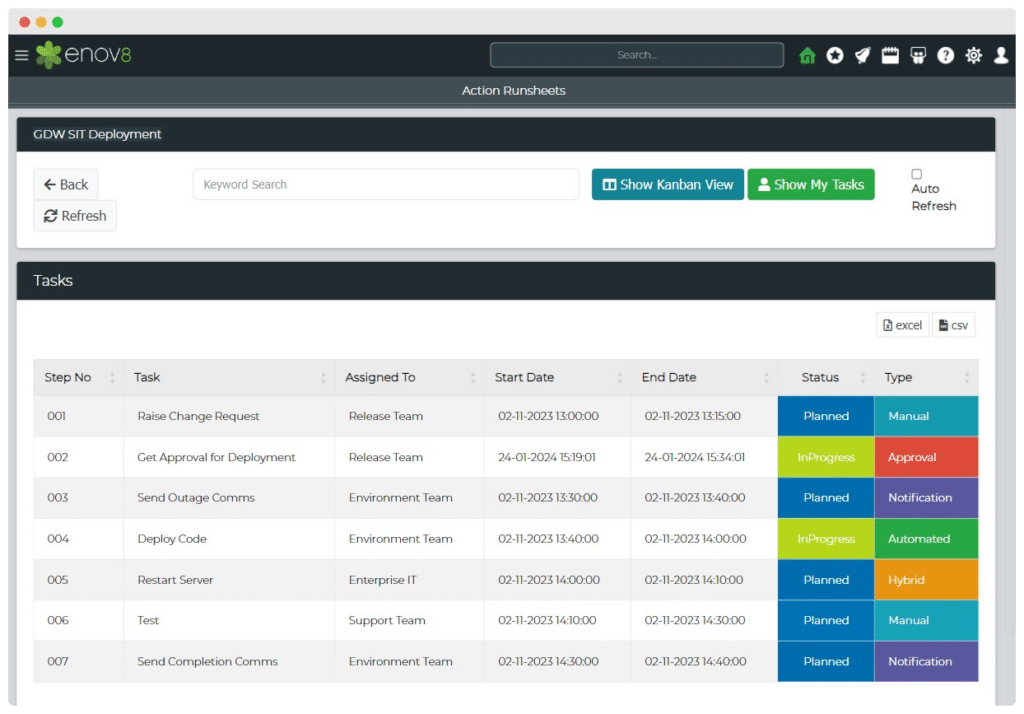
Enhancing DR with Enov8 Runsheets Automation
Enov8 Runsheets Automation streamlines IT teams’ operational processes, defining automation steps, integrating with DevOps tools, and offering real-time process visibility. This tool not only saves costs but also allows for continuous process improvement.
Implementing Enov8 Automation
- Runsheet Creation: Detail the operational steps necessary for recovery.
- Execution: Utilize Enov8’s automation to carry out steps efficiently, with real-time monitoring.
- Continuous Optimization: Regularly review and enhance runsheets for improved performance.
Conclusion
Incorporating runsheets into disaster recovery plans is crucial for a structured, effective approach to managing crises.
By adopting best practices and leveraging tools like Enov8 Runsheets Automation, organizations can significantly enhance their preparedness, reduce downtime, and maintain business operations even in the face of disaster.
The integration of clear, accessible runsheets and the strategic use of automation will fortify an organization’s disaster recovery efforts, ensuring resilience and continuity.

Author Jane Temov
Jane Temov is an IT Environments Evangelist at Enov8, specializing in IT and Test Environment Management, Test Data Management, Data Security, Disaster Recovery, Release Management, Service Resilience, Configuration Management, DevOps, and Infrastructure/Cloud Migration. Jane is passionate about helping organizations optimize their IT environments for maximum efficiency.